Procédure
Service concerned : LWS shared email addresses / Pro mail / cPanel
Panel concerned : LWS Panel and cPanel
Level : beginner
Would you like to view messages received on your LWS email address from Gmail? The old method that allowed Gmail web to retrieve emails from an external mailbox using the POP protocol is being gradually removed by Google.
Depending on your needs, you can now redirect your new messages to Gmail, add your LWS mailbox in the Gmail mobile app, or configure sending from your LWS address in Gmail web.
Google is gradually removing the “Check mail from other accounts” and Gmailify features in Gmail on desktop.
After the first quarter of 2026, this feature will no longer accept new users. Existing configurations may continue to work until January 2027. It is therefore normal for the “Add a mail account” button to no longer be available in your Gmail account.
This help applies to several LWS environments.
To create a redirect, use the documentation corresponding to your service:
Which solution should you choose?
Choose the method that matches the result you want to achieve.
- Receive new messages in your main Gmail inbox: create a redirect to your Gmail address.
- [PERSON_NAME] LWS in the Gmail app: [PERSON_NAME] as an IMAP account.
- Send [PERSON_NAME] web messages with your LWS address: add the address in the “Send mail as” section.
- Fully manage your mailbox on a computer: configure it in Outlook, Thunderbird, or Mail.
A redirect and an IMAP configuration do not work [ADDRESS]. [ADDRESS] redirect forwards only new messages to Gmail. An IMAP configuration lets you directly access the [ADDRESS] mailbox, with its folders and read status, like a separate account.
Before you begin
If your address already exists as a real mailbox, [ADDRESS] do not delete it to replace it with a simple redirect. You could lose the messages stored there.
To keep your LWS mailbox while still receiving a copy of new messages in Gmail, create a [PERSON_NAME] Roundcube instead.
To use the Gmail app with IMAP or send from Gmail web with your LWS address, you must also have:
- your full [ADDRESS] email address;
- the password for this address;
- the IMAP and SMTP settings shown in the LWS Panel or on cPanel.
Receive new LWS messages in your Gmail inbox
Redirecting is the [ADDRESS] closest solution to Gmail’s old POP retrieval. Every new message sent to your LWS address is automatically forwarded to your Gmail address.
The method to use depends on whether or not a real LWS mailbox exists.
The LWS address does not yet exist as a mailbox
You can create a simple redirect.
For example, you can create the address [EMAIL] and forward all received messages to [EMAIL].
A simple redirect does not have an inbox. Messages are only sent to Gmail and no copy is kept at LWS.
To set it up, see the help: How do I create an email redirect with the LWS Panel?
If your plan uses cPanel, see instead: How do I create an email redirect in cPanel?
The LWS address already exists as a mailbox
If you already use this address in Roundcube, Outlook, Thunderbird, or on another device, keep the mailbox and create a redirect filter from Roundcube.
You can choose between two actions:
- Send a copy of the message to: the message stays in the LWS mailbox and a copy is sent to Gmail;
- Forward the message to: the message is forwarded to Gmail without remaining visible [ADDRESS] LWS.
To keep your messages at LWS, choose the Send a copy of the message to action.
[PERSON_NAME] help:
How do I create a filter in Roundcube webmail?
Check the redirect to Gmail
After creating the redirect:
- Send a test email to your LWS address from another address.
- Wait a few minutes.
- Open your Gmail inbox.
- Check the inbox as well as the Spam, Promotions, and All Mail folders.
The redirect works if the new message sent to your LWS address appears in Gmail.
A redirect only forwards new messages. [PERSON_NAME] old emails, folders, drafts, sent messages, or the read/unread status of your LWS mailbox.
Gmail may also classify some messages [PERSON_NAME] spam or reject them according to its own security checks.
[PERSON_NAME] your LWS address in the Gmail app
You can add your LWS mailbox in the Gmail app on Android, iPhone, or iPad using the IMAP protocol.
This method lets you read and send emails from your LWS address within the app. However, the LWS mailbox remains separate from your main Gmail inbox.
Adding via IMAP does not transfer messages into your main Gmail inbox. You view your LWS address as a separate account in the Gmail app.
Send [PERSON_NAME] web emails with your LWS address
Removing POP retrieval does not prevent you from using Gmail’s Send mail as feature.
This configuration lets you compose a message in Gmail web while displaying your LWS address as the sender. It uses your LWS mailbox’s SMTP server and is separate from receiving messages.
To use the LWS SMTP server, your address must be a real mailbox with a password. A simple redirect address does not have SMTP access.
To add your sending address:
- Open Gmail on a computer.
- Click the Settings icon, then [PERSON_NAME] all settings.

- Open the Accounts and Import tab.
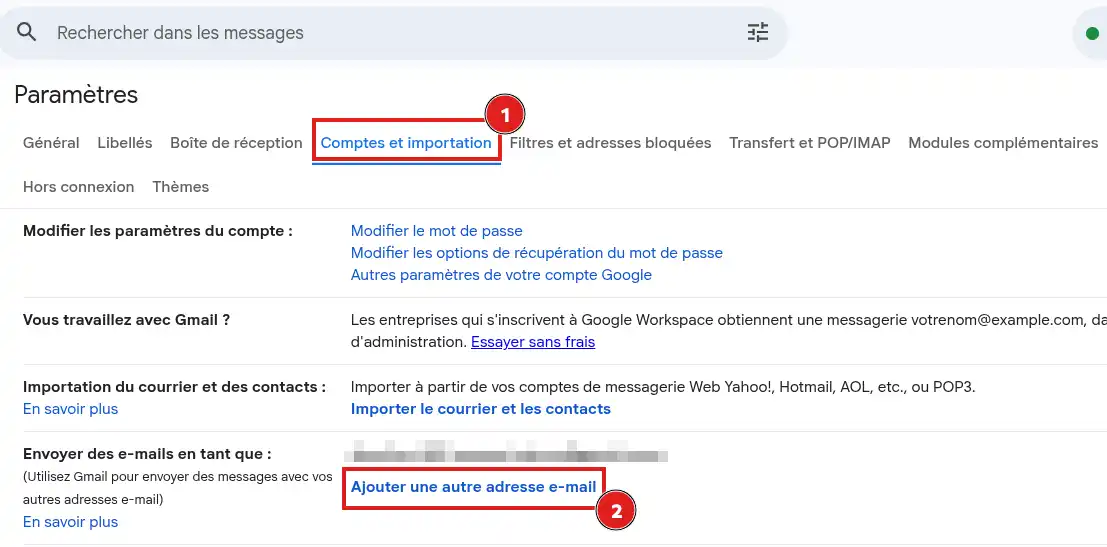
- In the Send mail as section, click Add another email address.
- [PERSON_NAME] the name that will be shown to your recipients.
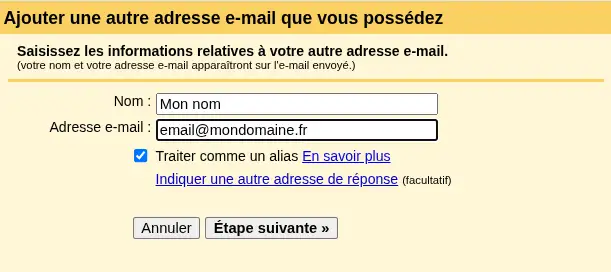
- Enter your full [ADDRESS] email address.
- Leave the "[PERSON_NAME] alias" box checked.
- Click Next step.
- [PERSON_NAME] the SMTP server indicated in your LWS customer area.
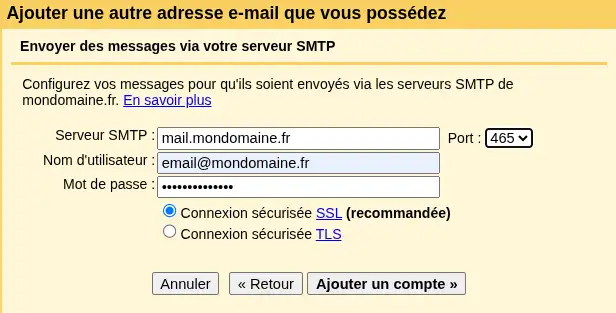
- Use your full [PERSON_NAME] email address as the username.
- [PERSON_NAME] the mailbox password.
- Select the port and secure connection indicated in the LWS configuration settings.
- Click Add Account.
[PERSON_NAME] then a confirmation message will be sent to your LWS address. Open this message, then click the confirmation link or enter the code received in Gmail.
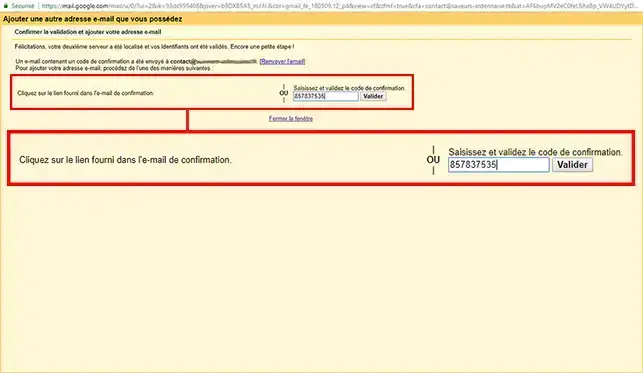
Once the address has been validated, you will be able to select it in the From field when composing a message.
[PERSON_NAME] sending
- Compose a new message in Gmail.
- Click the address displayed in the From field.
- Select your LWS address.
- Send the message to another address you can access.
- Check that the address [PERSON_NAME]>
The SMTP configuration works if the message is received with your LWS address in the sender field and if no sending error is returned in Gmail.
Common issues
I don’t see the “Add a mail account” button
This button belonged to the POP retrieval feature that is being gradually removed by Google. You cannot make it reappear from Gmail settings.
Use a redirect to receive new messages in your main Gmail inbox, or [PERSON_NAME] LWS mailbox in the Gmail app with IMAP.
The old POP retrieval still works in my account
Configurations created before the removal may continue to work temporarily, until January 2027 according to Google’s announced schedule.
Set up a redirect or an IMAP configuration before the final shutdown to avoid an interruption in receiving messages.
What happens to [PERSON_NAME] messages?
Messages retrieved before the feature was shut down remain [PERSON_NAME]. [PERSON_NAME] automatic retrieval of new messages is removed.
Redirected messages are not arriving [PERSON_NAME] Gmail
First check:
- that the destination Gmail address contains no error;
- that the message is not in the Spam folder;
- that the redirect uses the correct LWS address;
- [PERSON_NAME] the LWS mailbox is receiving messages normally.
Also send a test from several senders to the LWS address. If some messages arrive and others do not, Gmail may be filtering them according to its anti-spam rules.
Messages arrive in Gmail, but my replies leave with my Gmail address
A redirect only concerns receiving. To reply with your LWS address, [ADDRESS] Send mail as with its SMTP server.
When composing the message, also check the address selected in the From field.
I want to keep the same folders on all my devices
A redirect does not synchronize folders.
Add the LWS mailbox with IMAP in the Gmail app, Outlook, Thunderbird, or Mail. The folders and read status [PERSON_NAME] LWS.
Gmail rejects my LWS address password
Check that:
- you are using the email address password and not your LWS customer area password;
- the username matches the full email address;
- the incoming or outgoing server exactly matches the one shown in your customer area;
- SMTP authentication is enabled.
If in doubt, change the mailbox password from your customer area, then start the configuration again.

 Contact us
 Customer Area


 Visit LWS


 Yes
Yes No
No Article read
100890 once
Article read
100890 once Merci ! N'hésitez pas à
poser des questions sur nos documentations si vous souhaitez plus d'informations et nous aider à les
améliorer.
Merci ! N'hésitez pas à
poser des questions sur nos documentations si vous souhaitez plus d'informations et nous aider à les
améliorer.
 About
About 